
Automatic Data Enrichment
in CRM – via Email Forwarding
How a single forwarded email is enough to create complete contact and company records in the CRM – fully automated, error-free, and GDPR-compliant.
5–10 minutes. Per contact. Every day.
A new contact sends an email. Before you can reply, the manual work starts: name, phone number, job title – all copied from the signature and entered into the CRM. Then you look up the company, check if it already exists, add the address and management details, and link the contact.
With ten new contacts per day, that adds up to over an hour – every day. The result: CRM data gets maintained inconsistently, entries are inaccurate or outdated, and valuable sales time goes toward admin work.
Forward an email. Done.
What if a single forwarded email was enough to create the entire CRM record automatically and completely? That's exactly what we built: a fully automated data enrichment workflow that turns a simple email forward into a complete, cleanly maintained CRM entry.
The workflow at a glance
From incoming email to finished CRM entry – fully automated in seconds.
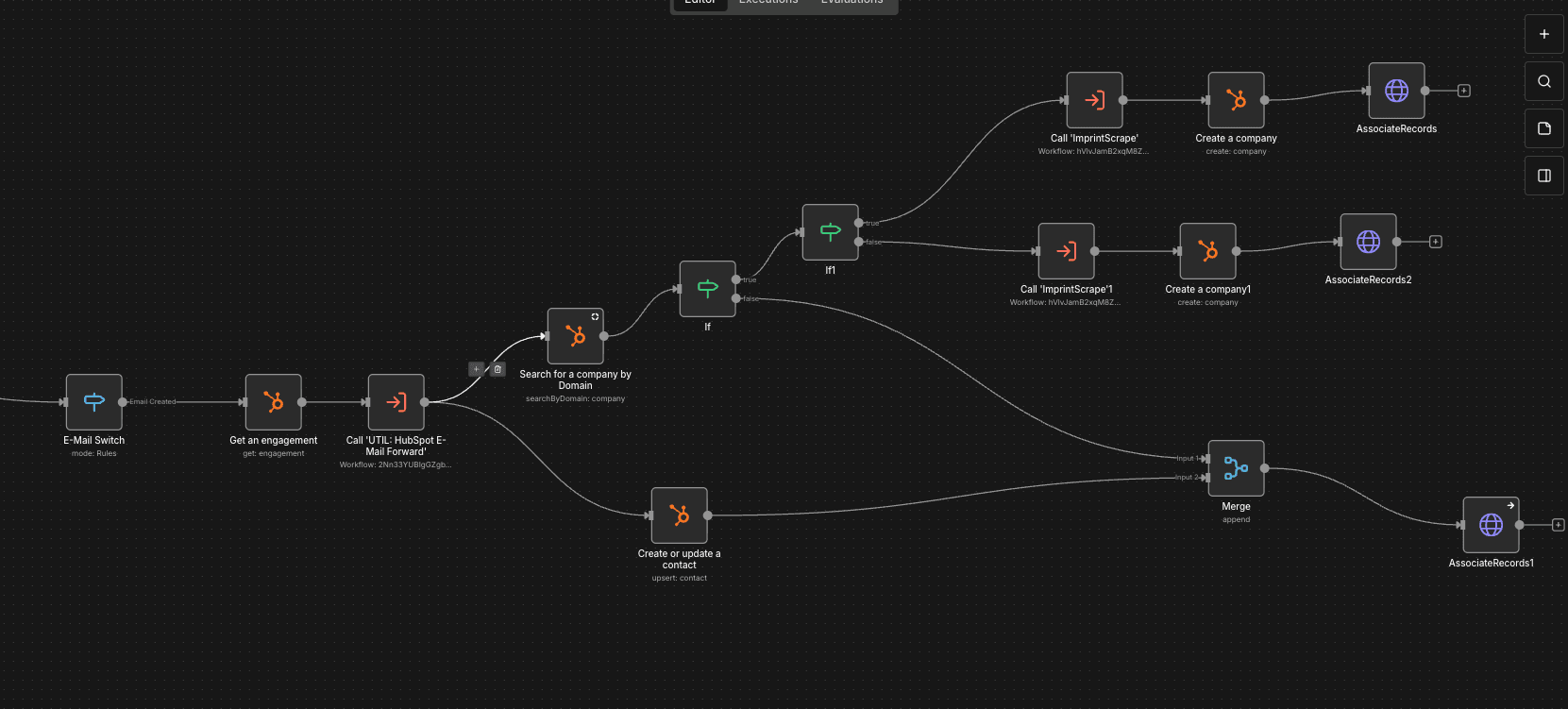
Four steps. Zero manual effort.
Extract contact data
The forwarded email is analyzed. AI extracts all relevant contact data from the signature: first name, last name, job title, phone number, mobile number, LinkedIn profile, and more.
Retrieve company data
The company website is automatically accessed. Structured data is extracted from the legal notice page: company name, address, managing directors, commercial register number, and VAT ID.
Create or update company
If the company already exists in HubSpot, the existing data is updated. If not, a new company record is automatically created and populated with all legal notice data.
Link contact and company
Finally, the contact is automatically assigned to the correct company in HubSpot. The CRM entry is now complete – without a single manual click.
The tech stack overview
The entire workflow runs GDPR-compliant: the OpenAI API uses a European endpoint with zero data retention, a Data Processing Addendum is in place, and only business contact data is processed.
Orchestrates the entire process – email trigger, API calls, logic, and error handling. Self-hosted for full control.
Contacts and companies are automatically created, deduplicated, and linked.
Extracts structured data from unstructured email signatures. EU endpoint, zero retention.
Automatically reads public legal notice data. No tracking, no third-party data providers.
GDPR-compliant. No compromises.
The most common question with AI-powered automation: “Is this GDPR-compliant?” Short answer: yes. Through proper configuration and contractual agreements with OpenAI, the entire workflow is set up in full compliance with data protection regulations – without your team having to worry about violations.
Data Processing Agreement (DPA) with OpenAI
A Data Processing Addendum per Art. 28 GDPR is in place with OpenAI. This means OpenAI processes data exclusively under instruction – as required by GDPR for data processors.
EU endpoint with zero data retention
The OpenAI API runs through a European endpoint. Zero data retention means: OpenAI does not store any of the transmitted data and does not use it for model training.
Only publicly available business data
Only business contact data from email signatures and publicly accessible legal notice information is processed. No private data, no tracking, no third-party data providers.
Self-hosted infrastructure
n8n runs on our own infrastructure – no third party has access to workflow data. Data only leaves the environment for targeted API calls to OpenAI and HubSpot.
Bottom line: With the Data Processing Agreement with OpenAI, the EU endpoint with zero data retention, and the exclusive processing of public business data, this workflow is fully GDPR-compliant. Your team can use the automation without worrying about data protection risks.
Before vs. After
Before – manual
- 5–10 minutes of manual work per new contact
- Typos, missing fields, inconsistent formats
- CRM maintenance gets skipped in day-to-day work
- Company data is missing or outdated
- More contacts = more effort
After – automated
- 0 minutes of manual effort per contact
- Structured, consistent data from the start
- 100% adoption: anyone can forward an email
- Company data automatically pulled from legal notices
- Scales without additional effort
Who is this for?
This workflow is a good fit for companies that use HubSpot as their CRM and regularly receive new business contacts via email.
Sales teams
That handle many incoming inquiries and need to transfer new contacts from emails to the CRM daily.
Agencies with changing contacts
Where CRM maintenance often falls behind because contacts change frequently.
Companies with CRM data quality issues
Whose data suffers from manual maintenance and who need structured, consistent entries.
Teams looking to cut admin work
To have more time for what actually matters: building relationships and closing deals.
Questions & Answers
Yes. The workflow is fully GDPR-compliant. A Data Processing Agreement (DPA) per Art. 28 GDPR is in place with OpenAI. The API runs through a European endpoint with zero data retention – OpenAI does not store any data and does not use it for model training. Only publicly available business data (email signatures and legal notice information) is processed.
The AI extracts structured data: first name, last name, job title, phone number, mobile number, email address, company name, website URL, and LinkedIn profile – if present in the signature. The extraction works regardless of the signature format.
This implementation uses HubSpot CRM as the target system. The workflow can also be adapted for other CRMs like Salesforce, Pipedrive, or Microsoft Dynamics, since n8n as the workflow engine has connectors for all major CRM platforms.
Manually creating a contact including company data typically takes 5–10 minutes. With 10 new contacts per day, the automation saves over 1 hour daily – that's around 20 working hours per month. The automated process takes a few seconds.
The workflow automatically checks for existing records. If a company already exists in HubSpot, the data is updated rather than duplicated. The contact is assigned to the existing company. This systematically prevents duplicates.
The workflow is built on four components: n8n as an open-source workflow automation platform (self-hosted), HubSpot CRM as the target system, the OpenAI API for AI-powered data extraction from email signatures, and web scraping for automatically reading legal notice data.
Sounds interesting?
Let's talk about what a similar solution could look like for you.