

My AI Assistant Knows My Clients, Reads My Emails, and Manages My Tasks -- via WhatsApp
Access HubSpot deals, create tasks in Waveboard, and answer emails via WhatsApp -- with OpenClaw as a self-hosted AI agent. Here is how my setup works.

My AI Assistant Knows My Clients, Reads My Emails, and Manages My Tasks -- via WhatsApp
I write on WhatsApp in the morning: "What are my open deals?" and get a list with stage, amount, and close date. Straight from HubSpot. No browser, no login, no searching.
I have been doing this for a few weeks now. It has changed how I work.
Too Many Tools, Too Much Switching
My workday as a freelancer looks like this: open HubSpot for a contact. Switch to project management, create a task. Check the inbox, decide what matters. Write a follow-up. Back to the CRM. Start a timer. Forget the timer.
Every switch between tools costs a few seconds. But more than that, it costs focus. You are in the middle of a thought, switch to the CRM briefly, and the thought is gone.
I counted for one day. 40+ tab switches. Most of them were just quick information lookups: what is the contact person name? What was the last status? Which tasks are open?
One Assistant, One Interface
I use OpenClaw -- an AI agent that I run on my own server. The interface is WhatsApp.
The agent has access to:
- HubSpot -- contacts, deals, activities
- Waveboard -- tasks, projects, time tracking
- My email inbox -- everything that came in today
No new tool, no new app. I message the agent like I would message a colleague.
Emails: Read, Sort, Reply
My inbox is a catch-all. Invoices, newsletters, client requests, automatic notifications from GitHub and HubSpot. All in one place.
I used to spend 15 to 20 minutes in the morning sorting through it. Now I ask:
"What emails came in today?"
The agent gives me a summary: who wrote, what it is about, what needs a reply. I can focus on the emails that actually require a response.
When I want to reply:
"Write a reply to the client -- I can confirm the appointment next Tuesday"
It knows the contact from HubSpot, knows the context from the email, and drafts a reply. I glance at it, adjust if needed, and send it. Done.
Tasks and Time Tracking Without Switching Tools
I manage my projects in Waveboard -- Kanban boards, time tracking, invoices. The agent has full access.
Creating a task:
"Create a task in the Pipewave project: write blog article, due tomorrow, todo column"
The task shows up in Waveboard. Right column, right date.
Daily planning:
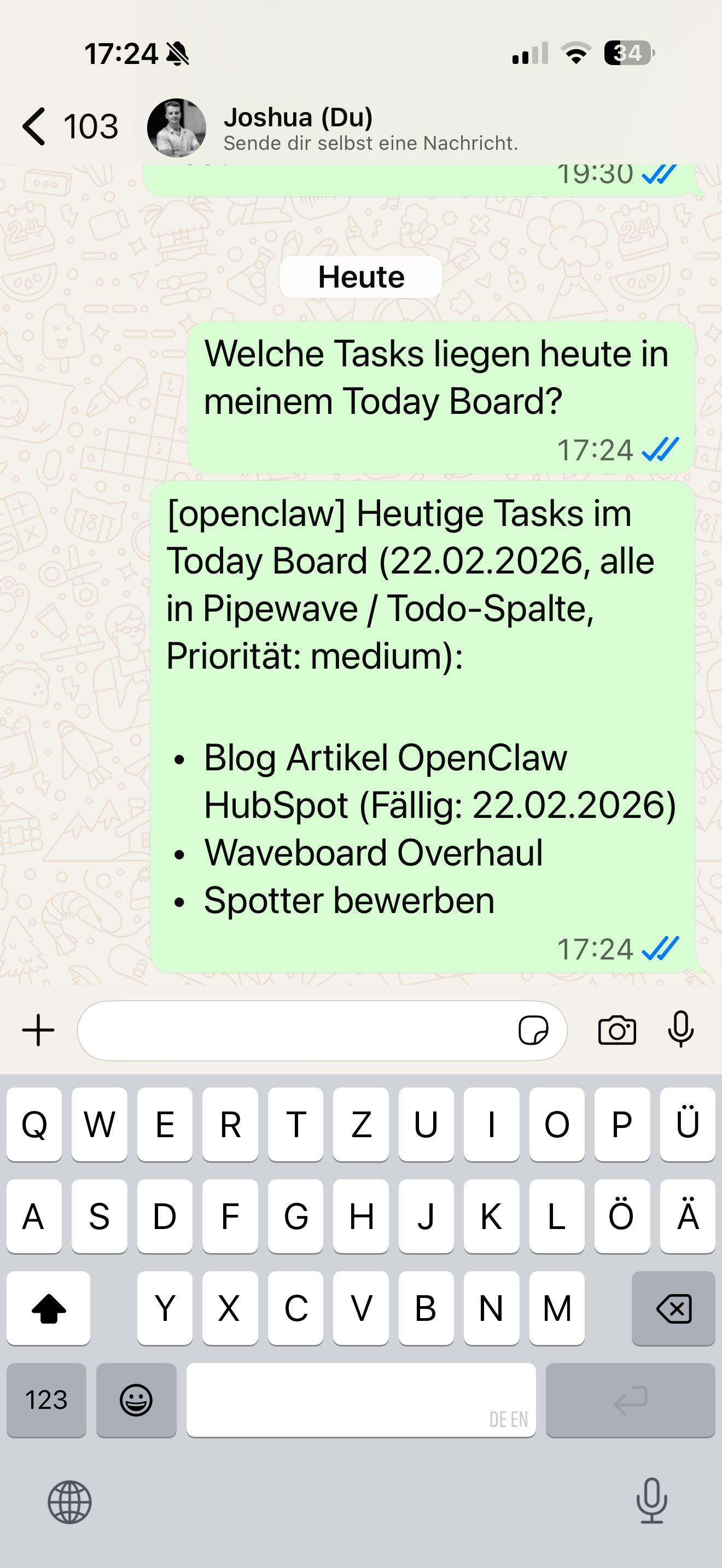
"What is on my Today Board?"
Instant overview: which tasks from which projects, with priority.
Starting a timer:
"Start a timer for the current project"
Timer is running. No tab switch, no clicking through the UI.
Each of these actions saves maybe 30 seconds on its own. But I do this ten to fifteen times a day. It adds up.
CRM Access in Seconds
HubSpot holds a lot of information. The problem is rarely that data is missing. The problem is finding it fast enough.
Before a client call:
"Show me all info on the contact at company XY"
Contact details, recent activities, open deals. Three seconds instead of three minutes.
Pipeline check:
"Which deals do I have open right now?"
List of all active deals with stage and amount. Straight from HubSpot, straight into WhatsApp.
Looking up a lead:
"Is there a contact from example-company.com in HubSpot?"
Yes or no, with the relevant details. No logging in, no searching.
I use this especially when I am on the go. Right before a meeting in the car, on the way there, between two calls. Situations where I used to not have fast enough access to the information.
What Is Behind It Technically
The setup is smaller than you would think:
- OpenClaw as the AI agent, self-hosted on my own server
- WhatsApp as the interface via the official Business API
- API connections to HubSpot, Waveboard, and my mail server
All data stays on my server. No third party sees my client data or emails. That was important to me when choosing the tool -- especially with CRM data and emails involved.
What This Could Mean for Your Business
I also build this setup for clients. The typical configuration:
- AI agent connected to your CRM (HubSpot or others)
- Email access with summaries and draft replies
- Project management integration via chat
- Morning briefings: new emails, open tasks, active deals
- Custom integrations with your existing tools
The setup is usually ready within a few days. No long project, no elaborate onboarding. Most of the time goes into connecting your systems cleanly -- not into the tool itself.
If you want to know what this could look like for your situation, write to me. I will look at which tools you use and where an AI agent actually saves you time.
joshua@pipewave.de or directly via the contact form on pipewave.de
Joshua Kresse is the founder of Pipewave UG. Pipewave automates marketing and sales processes for startups and B2B companies.